On this page
Quick answer
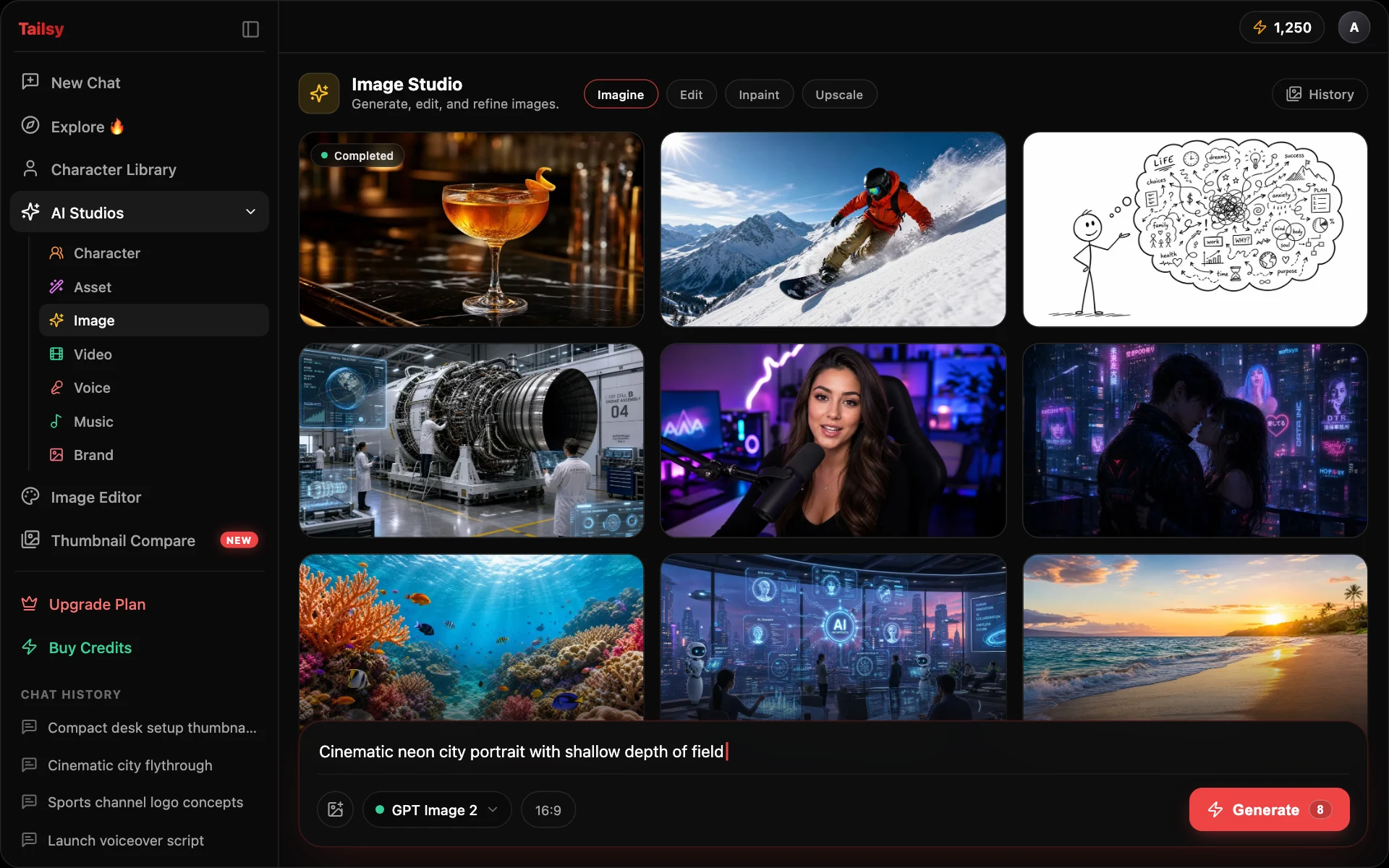
Tailsy Image Studio is an AI image generator and editor for creators. It combines text-to-image, prompt-based editing with reference images, inpainting, face or full-body swap, upscaling, background removal, and segmentation in one workspace, with a choice of models such as GPT Image 2.5, Nano Banana 2, Seedream, and Grok Imagine.
Key takeaways
- Seven modes in one place: Image, Image Edit, Inpaint, Swap, Upscale, Background Removal, Segmentations
- Choose the model per job, from fast drafts to 4K output and multi-reference edits
- Use the chat to plan the thumbnail and Image Studio for precise, manual control
- Swap and realistic edits of real people need their consent, and sometimes a YouTube disclosure
What can you do in Tailsy Image Studio?
Image Studio puts every image job a creator usually spreads across three or four apps into one workspace. Results land in one studio history, and you can reuse a result as the input for the next mode: generate a background, edit it, remove the background from a subject, then upscale the final.
| Mode | What it does | Typical creator use |
|---|---|---|
| Image | Text-to-image generation with the model, aspect ratio, and resolution you choose | A background plate, a prop, or a full thumbnail concept |
| Image Edit | Edits an image from a written instruction, with extra reference images on models that support them | Change the sky, swap an outfit, add a product you photographed |
| Inpaint | You paint over an area and describe what should replace it | Fix a hand, remove a stray object, replace one sign |
| Swap | Moves a face ("Just face") or a whole person ("Full body") from a source photo or a saved character onto a target image | Put your own face on a strong composition |
| Upscale | Raises the resolution of an existing image | Rescue a low-resolution frame grab or an older thumbnail |
| Background Removal | Cuts the subject out onto a transparent background | Clean cutouts of you or a product for layering |
| Segmentations | Isolates the objects you name in a short text prompt and returns masks | Separate one person or object from a busy frame |
Which image model should you choose?
Models differ in speed, cost, maximum resolution, and how many reference images they accept for edits. The studio shows the credit cost before you run anything, and costs change with model and resolution, so it's worth matching the model to the job instead of always reaching for the most expensive one.
| Model family | Notable controls | Good fit for |
|---|---|---|
| Grok Imagine / Grok Imagine Image 2 | 1K or 2K output; Image 2 adds a quality setting; edits take up to 5 source images | Quick concept rounds (Grok Imagine is the default generator) |
| GPT Image 2.5 Flare / Sunburst | Custom dimensions, quality setting, transparent background option; edits take up to 10 references | Assets that need a cutout-ready background or an exact size |
| Nano Banana 2 / 2 Lite / Pro | Pro goes up to 4K; Nano Banana 2 and Pro edits accept up to 14 references | Multi-image compositions and detailed edits |
| Seedream 4.5 / Seedream 5 Pro | 4.5 has size presets or custom sizes; 5 Pro is the premium tier with 1K or 2K output; edits take up to 10 references | Multi-image composition (Seedream 4.5 Edit is the default editor) |
| MAI-Image-2.6 / Flash | Generation and reference editing; Flash is the cheaper, faster variant | Alternate looks when other models keep missing |
| Muse Image, Pruna P-Image, Z Image Turbo | Fast, low-cost generation (Muse and Pruna also edit) | Cheap drafts before you commit to a premium render |
How do creators use Image Studio in a YouTube workflow?
Image Studio works best as the finishing bench behind the Tailsy chat. The chat develops the video idea, title, script, and thumbnail together so they make the same promise; Image Studio is where you take one piece of that package and control it by hand.
- 1
Settle the idea and title in chat
Describe the video and let the chat agent propose the angle, title options, and a thumbnail direction. The AI thumbnail generator page shows how that part works.
- 2
Generate the pieces you want to control
In Image mode, create the background plate or prop on its own, for example a clean desk scene with empty space on the left for your face and text.
- 3
Edit with references
In Image Edit, add your product photo or a frame from your video as a reference and describe exactly what should change and what should stay.
- 4
Cut out, swap, or inpaint
Remove the background from your subject, swap in your own face with consent, or paint over one broken detail in Inpaint.
- 5
Upscale and check at feed size
Upscale the final image, then drop it into the YouTube thumbnail previewer to see it next to real videos on desktop and mobile.
Example: fixing a thumbnail draft step by step
Here is an illustrative example for a video titled "I Tried Living on $10 a Day in Tokyo." The chat produced a strong concept: the creator holding a single convenience-store rice ball in front of a neon street. Two things are wrong with the draft: the background text is noisy, and the rice ball looks plastic.
In Image Edit, a focused instruction keeps everything you already like: "Change only the background signs so they are blurred, unreadable neon shapes. Keep the man, his expression, the rice ball, and the yellow headline exactly as they are."
Then in Inpaint, paint over the rice ball alone and write: "A real onigiri with a dark seaweed wrap and visible rice grains, held between thumb and fingers." Finish with Upscale before export.
- Name the change first, then list what must stay
- One change per instruction is easier to check than five at once
- Inpaint small areas; edit the whole image for mood, light, or background
When should you use Image Studio instead of the chat?
Use the chat when the question is creative: what the thumbnail should show, which title pairs with it, how to vary three directions. The agent writes the final image prompt itself, picks which of your uploads to use as references, and can generate several alternatives in one turn.
Use Image Studio when the question is mechanical: you know exactly what you want and need to choose the model, the size, the references, or the masked area yourself. Many creators bounce between the two, and finish layout and text by hand in the AI thumbnail editor.
Limits and good practice
AI image models still make mistakes with hands, small text, logos, and counts of objects. Check every result at full size before you publish, and keep on-image text short. Image Studio and the other studios are part of paid plans starting with Starter; new accounts get free credits to try the chat first.
Realistic images of real people deserve extra care. Swap and character tools should only use faces of people who have agreed to it. If a video contains realistic altered or synthetic footage, such as a real person appearing to do something they didn't, YouTube asks you to disclose it with the altered or synthetic content setting in YouTube Studio. Clearly fantastical images, beauty filters, and AI help with ideas or scripts don't need that disclosure. YouTube's policies on misleading thumbnails apply either way.
Do
- Use your own face or faces you have permission to use
- Keep a before and after of every edit so you can roll back
- Match the thumbnail to what actually happens in the video
- Check YouTube's current disclosure guidance for realistic synthetic content
Avoid
- Swap a celebrity or a stranger into a thumbnail
- Imply an endorsement or event that didn't happen
- Trust small generated text without reading it letter by letter
- Upscale as a substitute for fixing a weak composition
Workflows and models
- GPT Image 2.5 Flare and GPT Image 2.5 Sunburst, for generation and editing
- Nano Banana 2, Nano Banana 2 Lite, and Nano Banana Pro
- Seedream 5 Pro and Seedream 4.5
- Grok Imagine and Grok Imagine Image 2
- MAI-Image-2.6 and MAI-Image-2.6 Flash
- Muse Image, Pruna P-Image, and Z Image Turbo
Frequently asked questions
Is Image Studio only for YouTube thumbnails?
No. It generates and edits any image, in any supported aspect ratio. Most creators use it for thumbnail assets, channel art, social posts, and start frames for AI video.
Can I edit an image I uploaded?
Yes. Upload it to Image Edit, Inpaint, Swap, Upscale, Background Removal, or Segmentations. Image Edit can also take extra reference images on models that support them, up to 14 on Nano Banana 2 and Nano Banana Pro.
Which model is best for thumbnails?
There isn't one winner. Grok Imagine is the default for quick generation, Seedream 4.5 Edit is the default editor, Nano Banana Pro is useful when you need up to 4K output, and GPT Image 2.5 is handy when you need a transparent background or exact dimensions.
Can I make a transparent PNG?
Yes. Background Removal cuts out any subject, and GPT Image 2.5 can generate with a transparent background directly.
How much does Image Studio cost?
Each run uses credits, and the cost depends on the model and resolution. The studio shows the price before you generate. Image Studio requires a paid plan starting with Starter; new accounts get free credits on sign-up.
Do I need to label AI images on YouTube?
YouTube's disclosure setting is about realistic altered or synthetic content in the video, such as making a real person appear to say or do something they didn't. Clearly unrealistic imagery and AI help with production tasks generally don't need it. Check YouTube's current help pages, since the rules get updated.