On this page
Quick answer
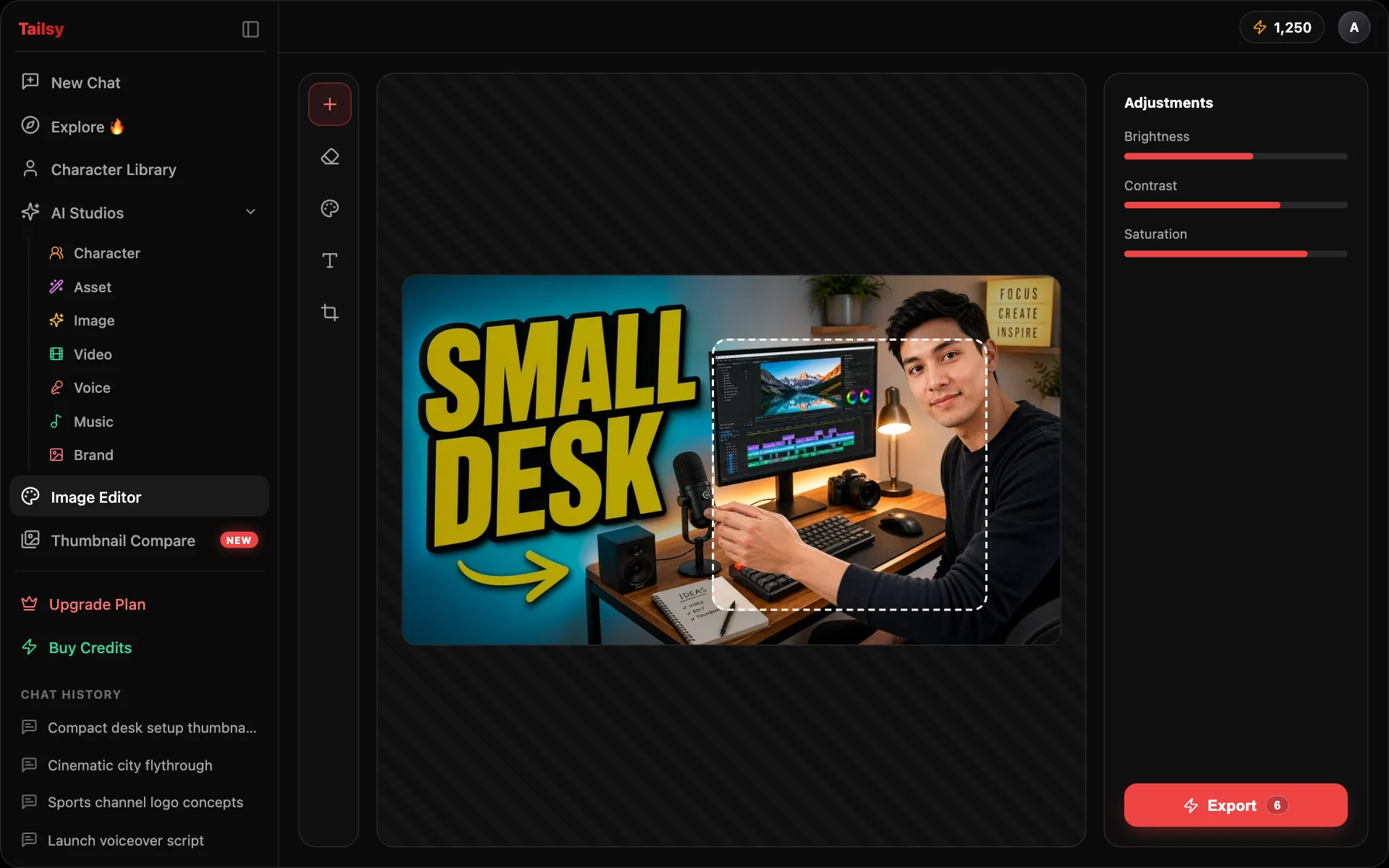
Tailsy's AI thumbnail editor works at three levels. In chat, describe a change and the agent edits only that part. In Image Studio, use prompt edits, inpainting, face swap, background removal, and upscaling. In the Image Editor canvas, adjust text, layers, and cutouts with AI Smart Select, then export a 1280×720 PNG, JPEG, or WebP.
Key takeaways
- Describe edits in plain language; name the change, then what must stay
- Use Inpaint for one broken detail and Swap to put your own face in
- Finish text, layout, and cutouts by hand in the canvas editor
- Check the edited thumbnail at feed size before you upload
Three ways to edit a thumbnail in Tailsy
Different problems need different amounts of control. A mood change is one sentence in chat. A broken hand needs a mask. A headline that's two pixels too close to the edge needs your own mouse.
1. Chat edits: describe what to change
Ask for the change in plain language and the agent applies it to the image you're talking about, keeping the text, people, and composition you already approved. It distinguishes a focused fix ("make the background darker") from a new direction ("make it about the failure, not the success"), which reopens the composition while keeping your premise. You can also click Edit on an image for a quick direct edit that uses only your instruction and that image.
2. Image Studio: precise AI tools
Open the thumbnail in the AI Image Studio when you want to choose the model or the area. Image Edit takes extra reference images; Inpaint regenerates only what you paint over; Swap moves a face or full body from a photo or saved character; Background Removal and Segmentations make cutouts; Upscale sharpens the final. Image Edit, Inpaint, and Swap show a before-and-after compare view.
3. Image Editor canvas: manual finishing
The Image Editor is a layer-based canvas with a 1280×720 YouTube preset (plus 9:16 and 1:1). It has text with stroke and shadow styles, shapes, brush and eraser, layer masks and blend modes, and selection tools including AI Smart Select, Magic Wand, and Magnetic Lasso. Extract a selection to its own layer, rearrange, then export as PNG, JPEG, or WebP, with transparency where the format supports it.
Which tool fixes which thumbnail problem?
A quick map from the problem you see to the fastest fix. The example instructions are illustrative.
| Problem | Best tool | Example instruction or action |
|---|---|---|
| Headline misspelled or too long | Canvas Text tool, or chat | Retype it on the canvas, or ask: "Replace the headline with exactly 'I QUIT SUGAR' in the same style." |
| Six fingers or a melted object | Inpaint | Paint over the hand: "A relaxed right hand holding the phone, five fingers." |
| Background too busy | Chat edit | "Change only the background to a soft, out-of-focus kitchen. Keep me and the text exactly as they are." |
| Face doesn't look like you | Swap with your saved character | Choose "Just face" and let auto-select find the person, or paint the area yourself |
| Subject needs a new layout | Background Removal or Smart Select | Cut the subject out, then reposition it on the canvas |
| Text sits where the timestamp goes | Canvas Move tool | Drag text and faces away from the lower-right corner |
| Soft or low-resolution final | Upscale | Upscale before export, then re-check fine details |
How to write edit instructions that work
AI edits go wrong when the instruction is vague about scope. The model may "improve" things you liked. State the exact change first, then list what has to stay, and when the framing matters, say so directly.
| Weak | Stronger |
|---|---|
| Make it pop more | Brighten my face and add a thin white rim light on my left side. Keep the background, text, and crop unchanged. |
| Fix the text | Replace the headline with exactly "30 DAYS LATER" in thick white letters with a black outline, top left. Change nothing else. |
| Different background | Change only the background to a dim, empty office at night. Preserve everything else. Do not zoom in or out. Do not crop in or out. |
From draft to upload: an editing workflow
Editing is the last step of a package that starts with the idea. In Tailsy the title, script, and thumbnail come out of one conversation, so edits should protect that shared promise rather than drift away from it.
- 1
Generate or upload the draft
Create it in chat with the AI thumbnail generator, or upload one you made elsewhere.
- 2
Ask for a critique
Ask the chat what's weak. It judges the actual image against your title and audience, separates concept problems from execution problems, and won't promise a click-through rate.
- 3
Fix concept problems first
If the idea is unclear, revise the direction in chat. Polishing a weak concept wastes credits.
- 4
Fix execution problems with targeted edits
Hands, text, faces, and background clutter: one change per instruction, checked each time.
- 5
Finish on the canvas and export
Adjust the final text and positions, and export at 1280×720 as PNG, JPEG, or WebP.
- 6
Preview and compare
Check the result in the YouTube thumbnail previewer and compare variants side by side with Thumbnail Compare.
Limits and honest editing
AI edits can still change details you didn't mention, so compare before and after every time. Generated text needs a letter-by-letter read. AI tools in Image Studio need a paid plan starting with Starter; new accounts get free credits to start in chat.
Editing also has rules. Swapping a face or editing a real person into a realistic scene needs that person's consent. YouTube's policies prohibit thumbnails that mislead viewers about what the video contains. If a video includes realistic altered or synthetic content, such as a real person appearing to do something they didn't, YouTube asks you to disclose it with the altered or synthetic content setting in YouTube Studio. See common thumbnail mistakes for what to avoid.
Do
- Keep the thumbnail's claim true to the video
- Save the original before heavy edits
- Edit faces only with the person's permission
Avoid
- Add fake screenshots, quotes, or results
- Stack ten changes in one instruction
- Place key text in the lower-right corner
Workflows and models
- GPT Image 2.5 Flare Edit and GPT Image 2.5 Sunburst Edit
- Nano Banana 2 Edit and Nano Banana Pro Edit
- Seedream 4.5 Edit and Seedream 5 Pro Edit
- Grok Imagine Edit and Grok Imagine Image 2 Edit
- Inpainting, face and full-body swap, background removal, and upscaling
- In-browser Smart Select (Segment Anything 2.1), Magic Wand, and Magnetic Lasso
Frequently asked questions
Why edit a thumbnail if AI generated it?
Generation gets the concept close. Editing fixes the details viewers notice at a glance, such as spelling, hands, faces, and where the text sits, without throwing away a composition that works.
Can I edit a thumbnail I made in another tool?
Yes. Upload it to chat, Image Studio, or the Image Editor canvas. Uploading images in chat and Image Studio requires a paid plan starting with Starter.
Can I change just one part of the image?
Yes. In chat, ask to change only that element and name what stays. For pixel-level control, paint the area in Inpaint, or select it on the canvas with Smart Select or the lasso.
Can I put my own face into an existing thumbnail?
Yes. Use Swap in Image Studio with a photo of yourself or your saved character, choosing face only or full body. Only swap in faces of people who have agreed to it.
What export formats does the canvas editor support?
PNG (with background or transparent), JPEG, and WebP (with background or transparent). The YouTube preset is 1280×720.
Will editing guarantee a higher click-through rate?
No tool can promise that. Editing makes the thumbnail clearer and more honest. Whether it wins is something you measure after publishing, for example with YouTube's thumbnail testing.