On this page
Quick answer
Tailsy's AI thumbnail generator turns a description of your video into finished YouTube thumbnails. It plans each concept around the title as one combined hook, adds short hook text only when the picture needs it, and generates up to three distinct directions per message. You then edit the best one by chatting instead of starting over.
Key takeaways
- Each thumbnail is planned beside your title, so the two make one promise
- Hook text is optional and short; the picture carries one reason to click
- Generate up to three distinct directions per message, in 16:9 or 9:16
- Edit by chatting: focused fixes keep the details you already approved
- Your trained face, references, styles, and script all feed the same chat
What does Tailsy's AI thumbnail generator actually do?
You describe the video the way you would to a designer: the title, who it is for, and what happens in it. Tailsy works out the single promise, question, or payoff that gives that viewer a reason to care, then designs a thumbnail around it. You do not write image prompts; Tailsy writes them for you and sends them to the image model.
It treats a thumbnail as a billboard, not a slide. Every concept is built to be understood in a glance at phone-feed size: one focal point, at most one short text idea, and one story the viewer can feel instead of information they have to read. Charts, caveats, and secondary facts are left to the title and the video.
A short brief is enough. "Thumbnail for: I Tried Living on $10 a Day in Tokyo" gives it a subject, a stake, and a setting, and it makes the creative decisions from there. If something important is missing, such as which of two people should lead, it asks with a quick multiple-choice card instead of guessing.
- Generate one to three images per message using the image slider under the message box
- Choose 16:9 for regular videos or 9:16 for vertical covers
- Set the slider to Text only to discuss concepts without spending image credits
- Explicit requests for text, layout, or style override the defaults
How does it pair the thumbnail with your title?
Viewers read the title and thumbnail together, so Tailsy plans them as one combined hook. For each concept it decides whether the image should reinforce the title, complement it with information the title leaves out, or contrast with it. Usually the image shows the moment, evidence, scale, or emotion, and the title supplies the context or the open question.
Hook text is used only when it improves the package. When it appears, it carries the part of the hook the picture cannot state on its own and does not repeat the title word for word. Your exact wording is kept verbatim, and "no text" means none. For more on this, see our guide to making clickable YouTube thumbnails.
| Title | Thumbnail concept | Hook text | Pairing |
|---|---|---|---|
| I Tried Living on $10 a Day in Tokyo | Creator at a convenience-store counter holding one rice ball, a long receipt curling off the counter | "DAY 3" | Complement: the image adds the struggle the title implies |
| Why Your Sourdough Isn't Rising | Two jars side by side: one flat, one bubbling over the rim | None | Reinforce: the picture shows the problem and the fix |
| This $40 Keyboard Beat My $200 One | Cheap keyboard on a podium, expensive one pushed to the edge of the desk | "WAIT…" | Contrast: the image stages the upset, the title names the prices |
Generate, compare, then edit by chatting
The real work happens after the first result. Tailsy treats every follow-up as a revision of the same project, so you can steer it like an editor instead of rewriting a prompt from scratch.
- 1
Describe the video and set the image slider
Give the title or topic and anything the thumbnail must include. Slide up to two or three images if you want to explore directions.
- 2
Compare distinct directions
For open exploration each image gets a different focal point and visual idea for the same premise, not three versions of one layout. Check them at feed size with the YouTube thumbnail previewer.
- 3
Ask for focused changes
"Same scene, but I look worried." "Make the jar bigger and the background darker." A specific element edit keeps the details you already accepted.
- 4
Change the hook when the idea isn't landing
If you change the theme, hook, or story, Tailsy reopens composition and expressions while keeping anything you locked, such as your face or exact text.
- 5
Finish and download
Use the image's Edit button for a quick direct tweak, or Add as reference in chat for a revision that uses the full conversation. Then download the final image.
Put your face, references, and style into the thumbnail
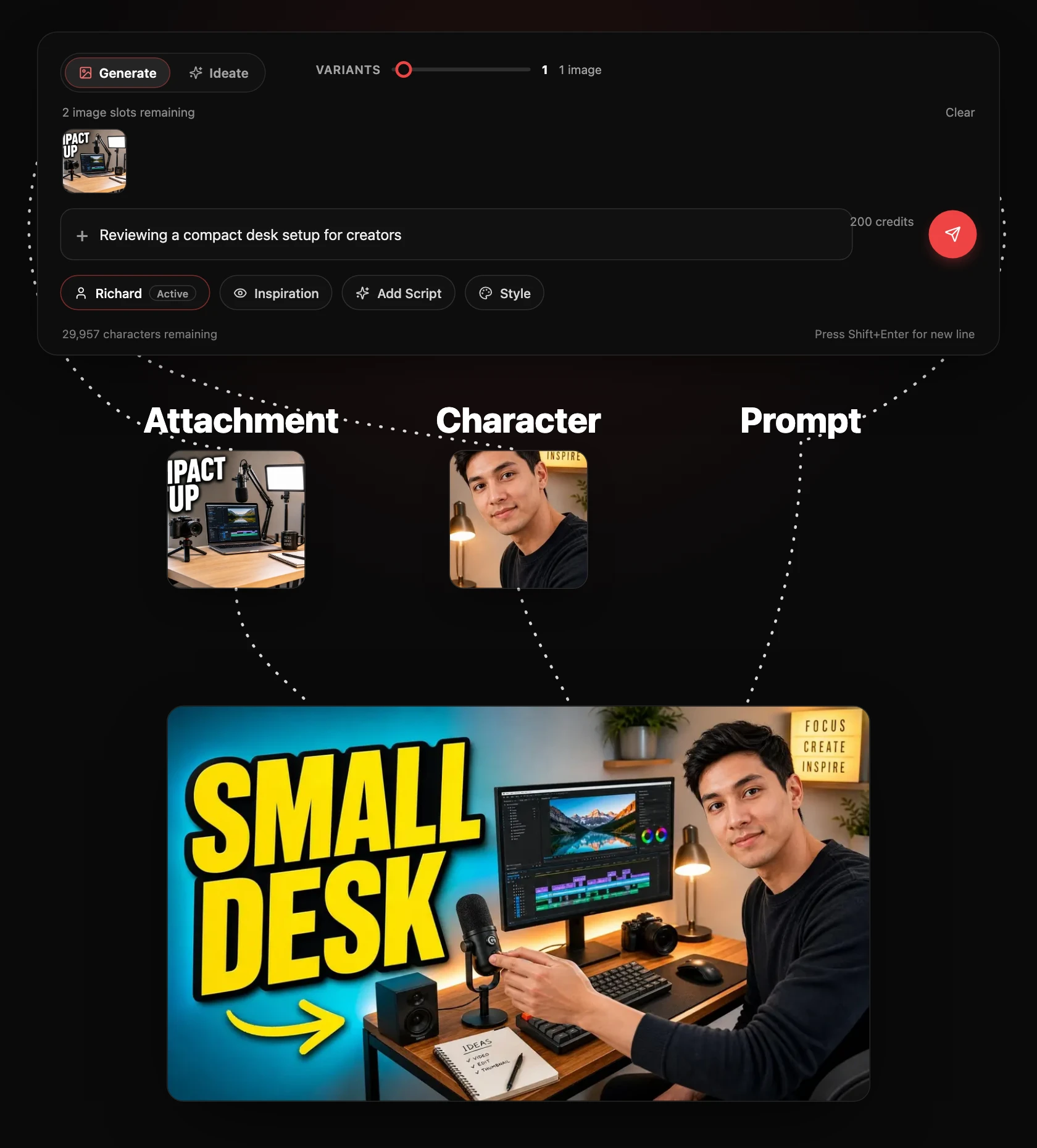
Everything that shapes the thumbnail is attached to the same chat message, so the AI sees it all at once.
Character
Train a character on clear photos of your face once, then select it in any chat. You lead the thumbnail with expressions and poses chosen for each scene, and you stay recognizable across a whole series. Only train on your own face or someone who has given permission.
Attachments and inspiration
Attach product shots, screenshots, or photos you want in the image. Add a reference thumbnail as inspiration and choose Inspire to borrow its visual language in a fresh composition, or Closely Match to follow its layout more tightly.
Styles, templates, and your script
Pick a style preset or a channel template for formats such as challenge, commentary, explainer, review, and storytelling. Use Add Script / Video to paste your script so the concept is based on what actually happens in the video; paid plans can also add a public YouTube link.
How to brief an AI YouTube thumbnail maker
The AI makes bold creative choices on its own, but a brief that states the promise gets a stronger first round. Compare these two requests for the same video.
Weak: "Make a thumbnail about budgeting." Stronger: "Title: I Cut My Grocery Bill in Half Without Coupons. For people who think saving means extreme couponing. Use my character, looking relieved. No more than two words of text."
Do
- State the title and who the video is for
- Name the one thing the viewer should feel or want to find out
- Give exact on-image wording in quotes if you have it
- Say what's locked when you edit, such as "keep my expression"
Avoid
- List every topic the video covers; the thumbnail carries one idea
- Ask for charts or long text blocks that won't read at feed size
- Regenerate from scratch when a focused edit would fix it
- Use a recognizable person's face without their consent
Idea, title, script, and thumbnail in one conversation
Most thumbnail tools start at the image. Tailsy can start earlier: develop the concept with the YouTube video ideas generator, shortlist titles with the AI YouTube title generator, and write the opening with the AI script generator. Because it all happens in one chat, the thumbnail is designed for the same promise the title makes and the opening delivers.
Writing uses only the per-message credit cost; generated images are charged per image, and unused image allowance costs nothing. New accounts start with free credits, so you can try a full idea-to-thumbnail run before choosing a plan.
Tools and functions
Just describe it
Type your video title or topic and the AI art-directs the thumbnail around it.
Title pairing
Each concept is judged beside your title so image and title work as one hook.
Character
Train your face once and star in your own thumbnails, consistently across videos.
Attachments
Attach photos, screenshots, or products to put specific elements in the thumbnail.
Inspiration
Add a reference thumbnail and choose Inspire or Closely Match.
Style
Apply a style preset or channel template for a consistent look across a series.
Add Script / Video
Paste your script so the AI understands the video before it designs the thumbnail.
Variants
Generate up to three meaningfully different directions in one message.
Ideas and titles
Brainstorm video ideas, titles, and scripts in the same chat before you generate.
Edit by chatting
Ask for focused changes in plain language, or open a direct image edit.
Workflows and models
- Top-tier image generation models with a built-in prompting engine
- Reusable character training for a consistent face
- Attachments, inspiration, styles, and channel templates
- Chat-based editing plus Image Studio face swap and cleanup tools
Frequently asked questions
Can the AI thumbnail generator create thumbnails from scratch?
Yes. Describe the video or paste its title and Tailsy designs and generates original thumbnail concepts. No template, design tool, or prompt-writing skill is required.
Does it write the text on the thumbnail?
When it helps. Tailsy decides whether short hook text improves the title and image package and writes it to complement the title rather than repeat it. If you supply exact wording it is kept verbatim, and if you say no text, it adds none.
How many thumbnails can I generate at once?
Up to three per message, set with the image slider under the message box. When you explore, each image takes a different visual idea for the same video. A focused edit produces one image unless you ask for variants.
Can I edit a thumbnail after it is generated?
Yes. Ask for changes in plain language and Tailsy revises the image while keeping details you already approved. You can also use the Edit button on an image for a quick direct edit, or open it in Image Studio for face swap, upscale, and background removal.
Can I put my own face in the thumbnail?
Yes. Train a character on photos of yourself and select it in the chat. Tailsy uses it as the lead and keeps you recognizable while choosing a fresh expression and pose for each concept.
Will it promise more clicks?
No. Tailsy explains why a concept fits your title and audience, but it does not promise click-through rates it cannot measure. Treat its suggestions as candidates and test them with YouTube's own tools after publishing.
Can it make vertical thumbnails for Shorts?
Yes. The chat supports both 16:9 and 9:16 output, so you can create a standard thumbnail or a vertical cover from the same conversation.