On this page
Quick answer
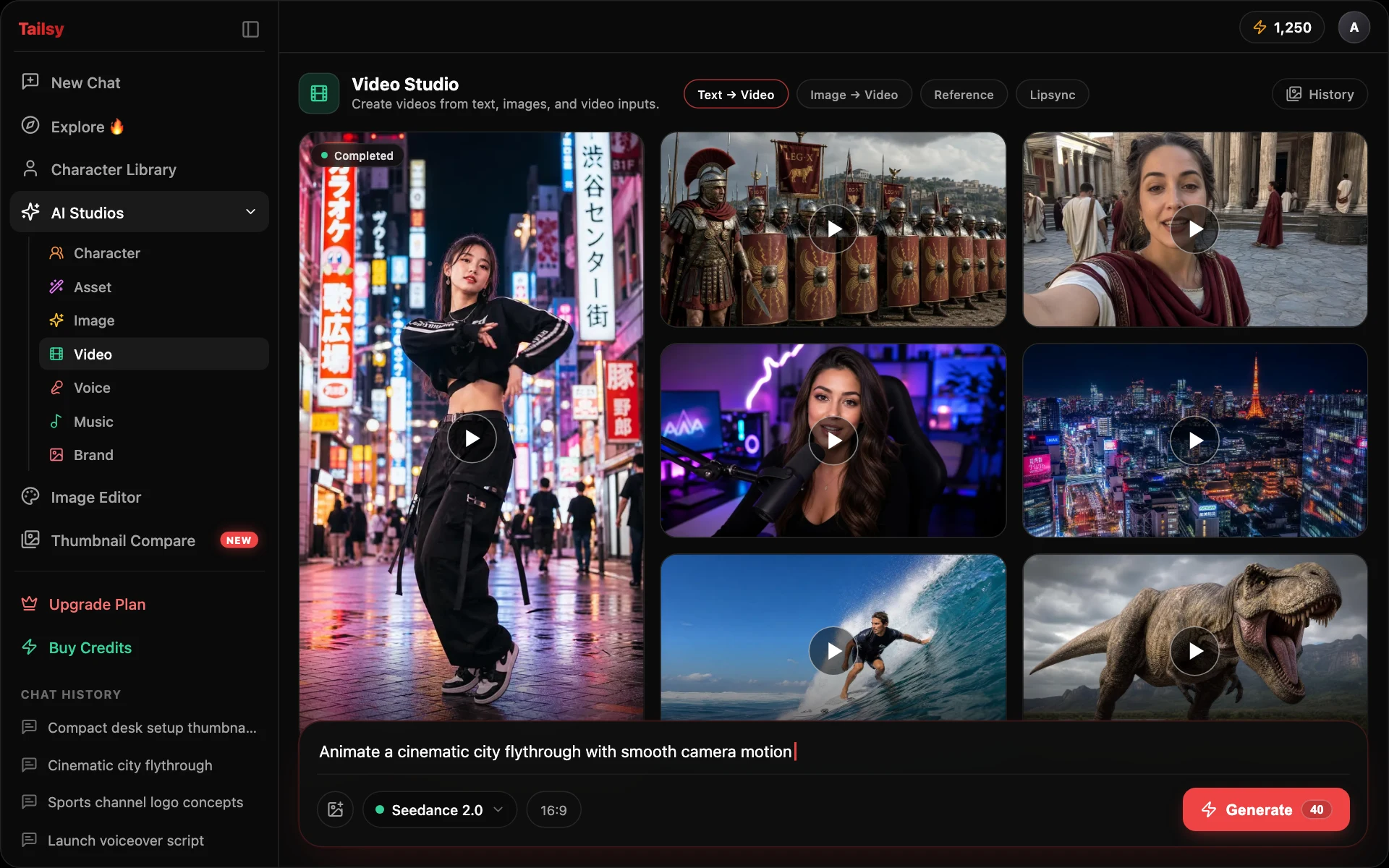
Tailsy Video Studio is an AI video generator for YouTube creators. It makes short clips, from 1 second up to 30 seconds depending on the model, from text, first and last frames, or image, video, and audio references, using models such as Seedance, Kling, Wan 3, and MiniMax H3. Separate tabs handle segmentation, upscaling to 2160p, and lipsync.
Key takeaways
- Generate clips from text, a start or end frame, or mixed references
- Pick from Seedance, Kling, Wan, MiniMax, Gemini Omni, Grok Imagine Video, and LTX models
- Segment, upscale, and lipsync in their own tabs
- Plan the shots in chat first so each clip serves a beat in your script
- Realistic synthetic footage may need YouTube's altered or synthetic content disclosure
What can you make in Tailsy Video Studio?
Video Studio has four tabs. Generate is where every video model lives. Depending on the model you pick, it takes a text prompt, a first frame (and often a last frame), or loose references such as images, video clips, and audio. Some models go further: Kling O3 and Gemini Omni 1.1 Flash can rework an existing clip, the original Grok Imagine Video can extend one, and Kling V3 supports multi-shot prompts and reusable elements.
The other three tabs work on footage you already have. Segment isolates the subjects you describe in a video. Upscale raises a clip to 720p, 1080p, 1440p, or 2160p. Lipsync matches mouth movement to an audio track, either on an existing video or by animating a still image of a person.
- Text to video, image to video, and reference to video in one Generate tab
- Native audio on many models, with an on/off switch where the model supports it
- Clip lengths from about 1 to 15 seconds on most models, up to 30 seconds on Wan 3 and Seedance 2.5
- Output up to 4K on Seedance 2.0 Standard, MiniMax H3, Gemini Omni 1.1 Flash, and LTX 2.5 Fast
Which AI video model should you use?
Each family has different strengths, input routes, and prices per second. The studio quotes the credit cost before you render, so you can draft on a cheaper tier and re-render the keeper on a better one.
| Model | Clip length | What stands out |
|---|---|---|
| Seedance 2.0 | 4–15 s | Standard, Mini, and Fast tiers; Standard renders up to 4K |
| Seedance 2.5 | 4–30 s | Large reference sets: up to 30 images, 10 videos, and 10 audio clips |
| Kling V3 | 3–15 s | Multi-shot prompts and elements built from a frontal photo plus angle shots |
| Kling O3 | 3–15 s | Reference-to-video and video inputs; elements keep characters and objects consistent |
| Wan 3 | 2–30 s | Standard and Prime tiers; image, video, and audio references |
| MiniMax H3 | 5–15 s | H3, H3 Max, and H3 Max Turbo; H3 renders up to 4K |
| Gemini Omni 1.1 Flash | 3–10 s | Video editing plus image and video references |
| Grok Imagine Video / 1.5 | 1–15 s | Image references; the original version can extend an existing clip |
| LTX 2.5 | 2–20 s | Fast and Pro tiers, plus audio-driven generation |
Where does AI video fit in a YouTube video?
AI clips are rarely the whole video. They earn their place in the gaps: the shot you can't film, can't afford, or need in a style your camera can't produce. Typical uses include establishing shots for a travel or history explainer, a visual metaphor during a tutorial, a stylized cold open, a short loop behind an intro title, or a vertical teaser for Shorts.
Because Tailsy's chat writes scripts, shot lists, and thumbnails in the same conversation, the clips can be planned around the same promise as the title and thumbnail. If the thumbnail shows a flooded city street, the B-roll in the first 30 seconds should pay that image off, not drift somewhere else.
Example: a timed shot list from chat
An illustrative excerpt for a video titled "Why Venice Floods Every Winter". The chat sizes spoken lines to the runtime, at roughly two words per second, and marks which shots are proposed reconstructions:
- 0:00–0:05 | AI clip (reconstruction): wide aerial of St. Mark's Square at dawn, water ankle-deep and reflecting the basilica, slow push in. VO: "Every winter, this square turns into a lake."
- 0:05–0:09 | AI clip: low angle, a café owner stacks chairs on tables as water creeps across the stone. VO: "And the city plans for it."
- 0:09–0:15 | Your footage: you on the raised walkway. VO: "Here's what actually causes it."
How to go from script to finished clips
A workflow that keeps AI footage consistent with the rest of your video:
- 1
Write the script and shot list in chat
Ask for a timed script with a shot list, and note which shots you'll film and which need AI. The AI YouTube script generator page covers how the chat sizes scripts to runtime.
- 2
Make the key frames
Generate a start frame for each AI shot in chat or in the AI Image Studio, using the same style and characters as your thumbnail.
- 3
Render a draft clip
In Generate, add the start frame, write one action and one camera move per shot, set the duration to match the shot list, and render on a fast or cheaper tier first.
- 4
Re-render, then upscale
Re-render the keepers on a higher tier if needed, then upscale them to the resolution of your timeline.
- 5
Cut in your editor
Download the clips and edit them into the video in your usual editing software. Video Studio makes clips; it isn't a timeline editor.
How to prompt AI video so it looks intentional
Video prompts fail in the same way thumbnail prompts do: too many ideas at once. Describe one subject, one action, the camera move, and the light. Save the story for your edit.
| Weak | Stronger |
|---|---|
| Epic shot of Venice flooding, cinematic, 4K, amazing | Aerial shot slowly pushing toward St. Mark's Basilica at dawn; shallow floodwater covers the square and mirrors the facade; soft pink light; no people. |
| Guy cooking pasta fast | Close-up, top-down: hands drop fresh pasta into a pot of boiling water, steam rises, camera holds still, warm kitchen light. |
Limits, credits, and disclosure
Clips are short, and longer sequences are built shot by shot. Models can still drift on faces, hands, and text inside the frame, so plan to cover a weak second with a cut. Costs are per second and vary with model, tier, and resolution. Video Studio requires a paid plan starting with Starter; new accounts get free credits on sign-up.
YouTube asks creators to disclose realistic altered or synthetic content, such as a realistic scene that never happened or a real person appearing to say or do something they didn't, using the altered or synthetic content setting when you upload. Clearly stylized or fantastical clips, and AI help with scripts or ideas, generally don't need it. Lipsync and character footage should only use people, and voices, you have permission to use.
Do
- Label reconstructions as reconstructions in your script and video
- Use AI clips to illustrate what you explain, not to fake evidence
- Keep a consistent style between thumbnail, key frames, and clips
Avoid
- Lipsync a real person to words they never said
- Present a generated news-style scene as real footage
- Skip the disclosure setting when realistic synthetic footage is central
Workflows and models
- Seedance 2.0 (Standard, Mini, Fast) and Seedance 2.5
- Kling V3 and Kling O3, Standard and Pro
- Wan 3 (Standard and Prime) and MiniMax H3 (H3, H3 Max, H3 Max Turbo)
- Gemini Omni 1.1 Flash, Grok Imagine Video, and Grok Imagine Video 1.5
- LTX 2.5 Fast and Pro
- Lipsync with Sync Lipsync v3, OmniHuman v1.5, Creatify Aurora, and LTX 2.5 Fast Audio to Video
Frequently asked questions
Can Tailsy generate a full YouTube video?
No. Video Studio generates short clips, up to 30 seconds on the longest models. The chat can write the full script and shot list; you assemble the clips and your own footage in a video editor.
Can I animate a thumbnail or image?
Yes. Use the image as the first frame in the Generate tab. Many models also accept a last frame, so you control where the shot ends.
Which models are available right now?
Seedance 2.0 and 2.5, Kling V3 and O3, Wan 3, MiniMax H3, Gemini Omni 1.1 Flash, Grok Imagine Video and 1.5, and LTX 2.5. Older models such as Veo 3.1, Wan 2.7, and LTX 2.3 are no longer offered for new renders.
Does Video Studio generate sound?
Many models generate native audio, and some let you switch it off. LTX 2.5 can also build a clip around an audio track, and the Lipsync tab syncs a person's mouth to audio you provide.
Can I edit or extend a clip I already have?
On supported models, yes. Kling O3 and Gemini Omni 1.1 Flash accept video input for editing, and the original Grok Imagine Video can extend a clip. Segment and Upscale work on videos you upload.
Do I need to disclose AI video on YouTube?
If the clip is realistic and could be mistaken for a real person, place, or event, YouTube asks you to turn on the altered or synthetic content setting. Check YouTube's current help pages, since the guidance is updated over time.